1. Why I Built GoFile – Share Files Without Accounts, Without Trusting the Server
Most file sharing tools either require accounts, store your data unencrypted on the server, or push you into a “cloud-first” workflow. I wanted something simpler: a small self-hosted app that I can run on my own machine or server, and share a file by link without the server being able to read it.
The idea behind GoFile is:
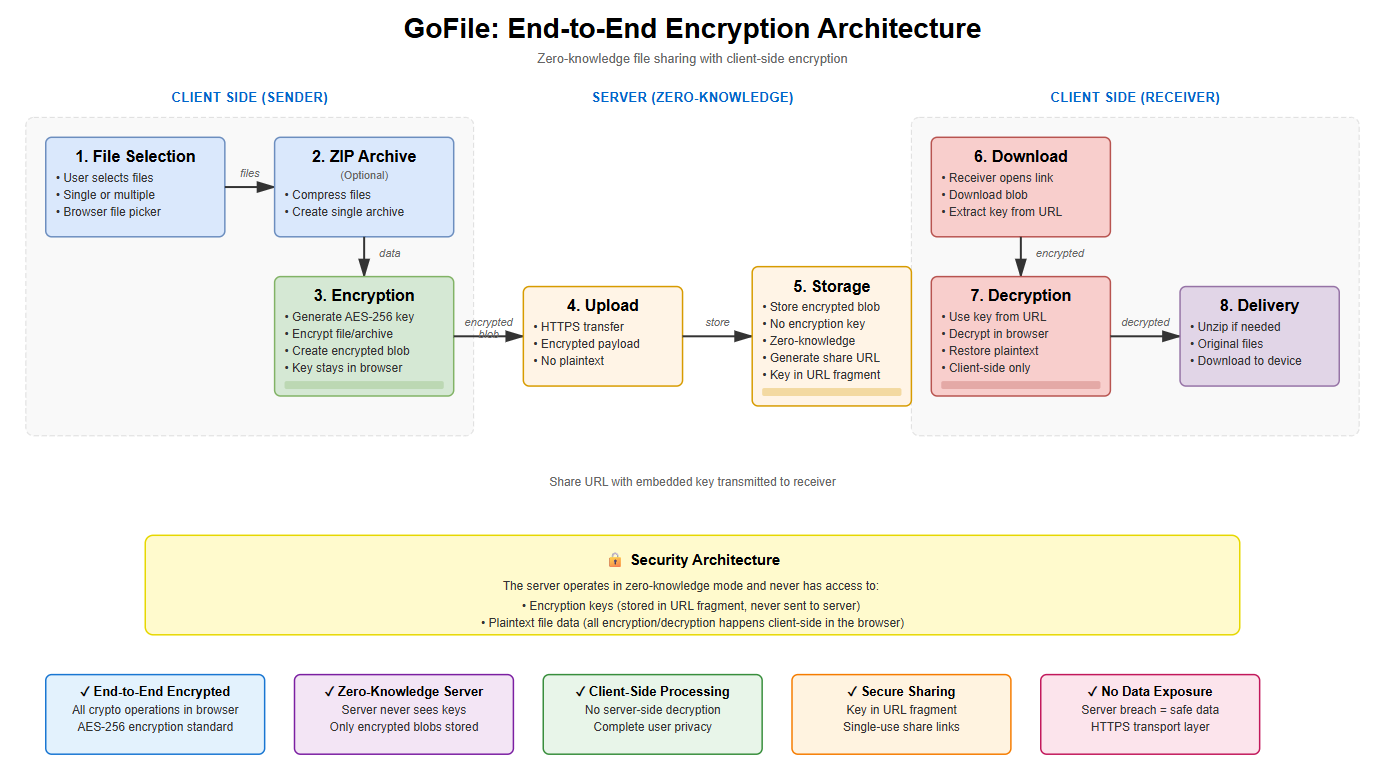
- Your browser encrypts the file before upload.
- The server stores only encrypted bytes + metadata (expiry, download limits).
- You share a link and a secret code out of band (different channel).
- The recipient decrypts locally in their browser.
This gives you a clean “send a file, keep privacy” workflow while keeping the backend small and easy to host.
2. Crypto & Security Model – AES-GCM + Wrapped Per-Upload Keys
GoFile treats the file as a crypto problem first. The plaintext never leaves the browser. The server receives only encrypted bytes and a wrapped key, plus a few policy fields for enforcement.
2.1 File Encryption – WebCrypto AES-GCM
When you select files, the browser generates a random encryption key and encrypts the file (or ZIP) with AES-GCM using the WebCrypto API. AES-GCM gives confidentiality + integrity: if bytes are corrupted or tampered with, decryption fails cleanly.
2.2 Secret Code Wrapping – PBKDF2 (SHA-256) + AES-GCM
The per-upload encryption key is not stored in plaintext. Instead, GoFile shows a human-readable secret code once, then derives a “wrapping key” from that code using PBKDF2 and uses it to encrypt (wrap) the random encryption key.
- KDF:
PBKDF2withSHA-256 - Iterations:
100,000 - Wrapped key encryption:
AES-GCM
The result: the server can store the wrapped key, but cannot decrypt it without the secret code. If you lose the secret code, the file is effectively unrecoverable (by design).
2.3 What the Server Knows (and Doesn’t)
GoFile is intentionally minimal on the backend side. The server enforces policy but cannot decrypt content. It stores:
- Encrypted file bytes
- Wrapped encryption key (
encryptedKeyB64) - File name (for download UX)
- Expiry time and max downloads
It does not store plaintext, and it never receives the secret code.
3. Storage & Policy Engine – Encrypted Blobs + Atomic Download Counters
Once the browser produces encrypted output, the backend’s job is straightforward: store bytes, store metadata, and enforce rules consistently.
3.1 Disk + SQLite Layout
GoFile stores encrypted file data as a blob on disk, and metadata in SQLite:
./data/<id>.bin     # encrypted bytes
./shares.db         # metadata (expiry, counters, wrapped key, file name)
This keeps the server lightweight: no external database server needed and no object storage required.
3.2 Expiry, Revocation, and Download Limits
Policy is enforced server-side, even if someone tries to bypass the UI:
- Expired shares are rejected.
- Revoked shares are rejected.
- If
maxDownloadsis set, each download consumes a slot. - The download counter increments atomically to avoid race conditions.
3.3 Multi-File Uploads (Zip in Browser)
If you pick multiple files (or a folder), the browser first builds a ZIP archive (via JSZip), then encrypts and uploads it as a single encrypted blob. This keeps the backend simple and makes the download flow consistent.
4. Running GoFile – From go run to a Small Home Server
GoFile is designed to be easy to run: a Go server plus static web files. Clone the repo, run the server, and access the UI from your browser.
4.1 Repository Layout
The project is split cleanly between backend and web UI:
.
├── server/
│   └── main.go
└── web/
    ├── index.html
    ├── share.html
    └── assets/
        ├── styles.css
        ├── upload.js
        └── share.js
4.2 Development Run
From the repository root:
git clone https://github.com/ciscoAnass/GoFile.git
cd GoFile

cd server
go run .
Then open:
http://localhost:8080/          # upload page
http://localhost:8080/share.html # download page
4.3 Production Notes (Small Server)
On first run, the server creates:
./shares.db
./data/
You can reverse-proxy it behind Nginx/Caddy if you want TLS, and keep it LAN-only if that matches your threat model.
5. Using the Web UI – Upload & Download Flows
The UI is intentionally minimal: it’s built to guide you through a safe workflow without endless knobs.
5.1 Upload – Encrypt and Share
- Open the upload page (
/). - Select one file, multiple files, or a folder (browser-dependent).
- Choose an expiry time.
- Optionally set max downloads (
0 = unlimited). - Click Encrypt and upload.
- Save the share link and the secret code (shown once).
Best practice: send the link and the secret code via different channels (for example, link by chat and code by SMS).
5.2 Download – Decrypt Locally
- Open the share link (example:
/share.html?id=<id>). - Enter the secret code.
- Click Decrypt and download.
- If it’s a ZIP, extract it to get all files.
Wrong codes or expired links fail safely and do not reveal anything about the file content.
5.3 Server API (Simple and Purpose-Built)
The browser talks to a small API: create a share, fetch metadata, then download. Example overview:
POST /api/create        # upload encrypted bytes + metadata
GET  /api/meta?id=...    # get wrapped key + file name + policy
GET  /api/download?id=... # download encrypted bytes (policy enforced)
6. What’s Next for GoFile?
GoFile already hits the main goal: share files with browser-based encryption, expiring links, and optional download limits. There’s still room to explore improvements without bloating the app:
- Hardening pass: more strict input validation, clearer error states, safer defaults.
- Better operational controls: admin-only revoke view, cleanup job for expired blobs.
- Optional stronger KDF: add an Argon2id option for secret-code derivation (still client-side).
- UX improvements: clearer “copy code once” flow and better mobile layout.
- Container recipe: minimal Dockerfile + compose for quick homelab deploy.
The philosophy stays the same: keep the backend small, keep crypto client-side, and make file sharing practical.
Want to discuss GoFile, browser crypto, or self-hosted tooling?
Reach out on LinkedIn or send me an email. I’m happy to talk about client-side encryption, small Go services, and practical homelab workflows.