1. Why I Built n8nai – A Safe Playground for Telegram + n8n + AI
I already use n8n for a lot of automation work, and I really like Telegram bots for quick interactions: short answers, translations, text clean-up, sending images from my phone and getting useful output back. But each new bot was starting to feel like a small infrastructure project:
- Set up HTTPS correctly so Telegram webhooks behave.
- Protect the n8n UI with basic auth and encryption key.
- Keep the stack reproducible across machines.
- Deal with self-signed certs and “not secure” warnings.
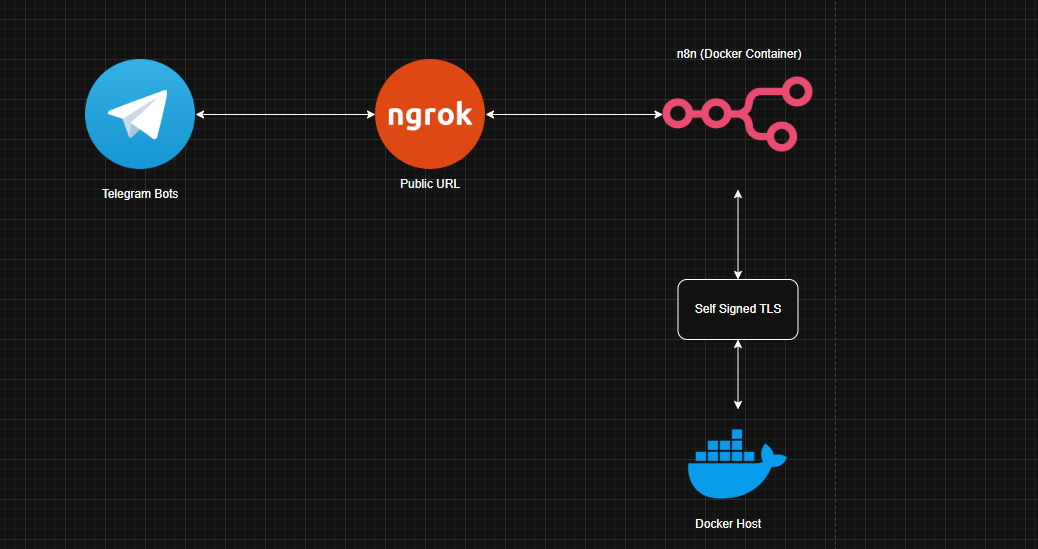
n8nai is my attempt to freeze all that into a single, reusable repository: one Docker Compose file, one SSL setup, one ngrok tunnel, and multiple AI-powered Telegram workflows you can import and start using in minutes.
2. Stack & Repository Layout
The goal with n8nai is to keep the stack minimal but “production-shaped”: you get HTTPS, an internal CA, basic auth and persistent storage without having to stitch ten different repos together.
2.1 What n8nai Ships With
- n8n running in Docker, exposed on
https://localhost:8080. - Self-signed CA + server certs under
ssl/for local HTTPS. - Ngrok to publish a temporary HTTPS URL for Telegram webhooks.
- Basic auth + encryption key controlled via
.env. - Telegram AI workflows for:
- Short answers (LLM-powered).
- Translator.
- Image → text transcriber.
- Text fixer (grammar & formatting).
2.2 Repo Structure
The repository is small enough to understand in one sitting:
.
├── docker-compose.yml
├── LICENSE
├── README.md
├── ssl/
│   ├── ca.crt
│   ├── ca.key
│   ├── ca.srl
│   ├── n8n.crt
│   ├── n8n.csr
│   └── n8n.key
└── Workflows/
    ├── Image-Transcribe.json
    ├── n8n-Ttranslate.json
    ├── Short-Answer.json
    └── Text-Fixer.json
The idea is: docker-compose.yml gives you the runtime, ssl/ gives
you HTTPS, and Workflows/ holds the n8n workflows that define the bots.
2.3 Environment Variables
The .env file is the control center for n8nai. It typically contains:
N8N_HOST=https://your-ngrok-url.ngrok-free.app
N8N_ENCRYPTION_KEY=your-long-random-key
N8N_BASIC_AUTH_ACTIVE=true
N8N_BASIC_AUTH_USER=admin
N8N_BASIC_AUTH_PASSWORD=change_me
N8N_HOST must be the public HTTPS URL (ngrok) so that Telegram can reach your
webhooks. The basic auth and encryption key add a minimal security layer around the n8n UI and
credentials.
3. Implementation – From Clone to Live Telegram Bots
The nice part about n8nai is that the setup fits on a single page: clone, generate certs,
configure .env, run Docker, start ngrok, plug the Telegram workflows.
3.1 Clone & Inspect the Stack
First step is the usual:
git clone https://github.com/ciscoAnass/n8nai.git
cd n8nai

# optional: inspect the compose file and workflows
ls
cat docker-compose.yml
The docker-compose.yml mounts the ssl/ directory into the container,
exposes 8080, persists n8n’s data, and reads all the configuration from
.env.
3.2 Generate a Self-Signed CA & Certificates
To run n8n on HTTPS locally you create a tiny internal PKI: a CA and a server certificate for the n8n host. A typical flow:
mkdir -p ssl

# 1) Create an internal CA
openssl genrsa -out ssl/ca.key 4096
openssl req -x509 -new -key ssl/ca.key \
  -days 3650 -sha256 -subj "/CN=asir-internal-ca" \
  -out ssl/ca.crt

# 2) Create an n8n server certificate
openssl genrsa -out ssl/n8n.key 2048
openssl req -new -key ssl/n8n.key -subj "/CN=n8n" -out ssl/n8n.csr
openssl x509 -req -in ssl/n8n.csr \
  -CA ssl/ca.crt -CAkey ssl/ca.key -CAcreateserial \
  -days 825 -sha256 \
  -extfile <(printf "subjectAltName=DNS:n8n") \
  -out ssl/n8n.crt
All of these files live inside ssl/, which the container then mounts so n8n can
serve HTTPS. You can also import ca.crt into your OS or browser trust store so the
warnings disappear.
3.3 Configure .env and Start Docker
With certificates in place, copy your env template and adjust:
cp .env .env.backup  # if you already have one
# edit .env and set N8N_HOST, basic auth, encryption key
Then run the stack:
docker compose up -dAfter a few seconds, n8n should be reachable at:
https://localhost:8080
Log in with the basic auth credentials from .env, create your initial n8n owner
account, and you’re ready to import the workflows from the Workflows/ folder.
3.4 Ngrok & N8N_HOST – Making Telegram Webhooks Happy
Telegram needs a public HTTPS URL to send updates to. That’s where ngrok comes in:
# with n8n already running on https://localhost:8080
ngrok http https://localhost:8080
ngrok prints a random https:// URL like
https://your-prefix.ngrok-free.app. Put that into your .env as
N8N_HOST and restart the container so n8n uses it for webhook URLs.
Inside each Telegram workflow, the Telegram Trigger node points to a webhook path
on that host. Once you activate the workflow, n8n registers the webhook and Telegram starts
sending messages to your ngrok URL, which are then forwarded into the workflow.
3.5 The Bots – Short Answer, Translator, Image Transcriber & Text Fixer
The Workflows/ folder holds four JSON workflows you can import into n8n:
- Short-Answer.json – a bot that returns short, direct answers based on an LLM (Groq, Gemini, etc.), ideal for quick questions.
- n8n-Ttranslate.json – a translation bot that takes incoming messages and responds in the target language you configure.
- Image-Transcribe.json – accepts an image from Telegram, passes it through an AI model that can read text, and returns the extracted text.
- Text-Fixer.json – cleans up grammar, spelling and formatting for any text you send it, and replies with a polished version.
All of them share a similar backbone:
Telegram Triggernode to receive updates.- One or more nodes to call Groq or Gemini LLM APIs.
Send Telegram Messagenode to push the result back to the user or group.
4. Lessons Learned – TLS, Webhooks and ChatOps UX
Building n8nai forced me to clean up a lot of half-baked notes about HTTPS, internal CAs and webhooks into a single, working recipe. A few takeaways:
- Self-signed CAs are powerful when organized. A simple CA + cert pair under
ssl/is enough to give you proper HTTPS for local automation tools. - Webhook-based bots need stable URLs. Using
N8N_HOSTas the “source of truth” for public URLs makes things easier to reason about. - Basic auth is a good first gate. It’s not a replacement for SSO or OAuth, but it’s much better than leaving n8n wide open on the Internet.
- ChatOps UX matters. Short, focused bots beat one “mega-bot” that tries to do everything with a million commands.
- Reproducibility pays off. Having Docker + SSL + ngrok + workflows tied into one repo makes it trivial to rebuild the stack later or move it to another host.
5. What’s Next for n8nai?
n8nai is intentionally small, but there’s a clear roadmap for turning it into a more complete “Telegram AI bot lab”:
- More workflows: add bots for summaries, code review, documentation search, or DevOps runbooks.
- Config via UI: manage Telegram tokens, Groq/Gemini keys and languages from a small config workflow instead of environment variables.
- Replace ngrok with Caddy/Traefik: for more permanent deployments with DNS and proper certificates.
- Observability: ship logs and metrics (per-bot usage, latency) to a Prometheus/Grafana stack.
- Multi-tenant mode: run several Telegram bots for different teams or groups, each with their own workflows and limits.
Even without those, n8nai already hits its main goal: give you a clean, repeatable starting point for building Telegram AI bots on top of n8n, with HTTPS and security handled from day one.
💬 Want to play with n8n + Telegram + AI?
Reach out on LinkedIn or email if you want to extend these workflows, wire them into your own stack, or build similar setups for other chat platforms.