1. Why I Built SteGo – Encrypted Secrets Inside Everyday Images
Most steganography tools feel either too “CTF / hacker toy” or too clunky. I wanted something I could run on a headless Debian server, open from any browser on my network, and use to hide encrypted snippets in images without installing a desktop app.
The idea behind SteGo is simple:
- Start a small Go HTTP server on your server or laptop.
- Open a web UI with two tabs: Embed and Extract.
- Hide a secret text (up to ~100 KB) inside a PNG/JPG using strong crypto + LSB stego.
- Later, use the same password to reveal the text from the image.
It’s not meant to be “magic unbreakable security”. It’s a practical tool for hiding small notes, license keys, or personal data in images you already share or store, with full control over where the server runs and how it’s exposed.
2. Crypto & Security Model – Argon2id + XChaCha20-Poly1305
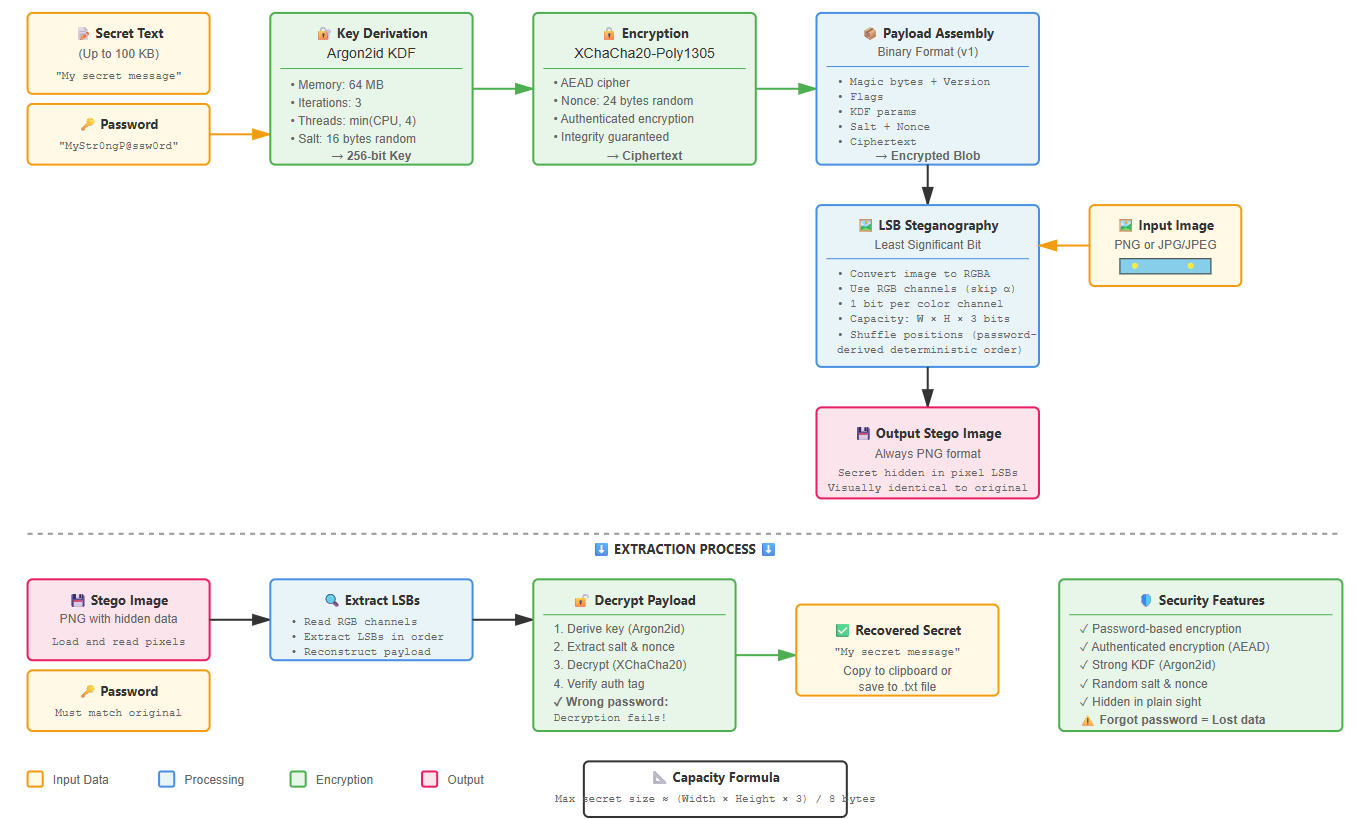
Before touching pixels, SteGo treats your secret as a crypto problem. The text you paste never goes directly into the image: it first goes through a modern password-based encryption layer.
2.1 Key Derivation – Argon2id
SteGo derives an encryption key from your password using Argon2id, with parameters tuned for interactive use:
- Memory:
64 MB - Time cost:
3iterations - Threads:
min(runtime.NumCPU(), 4) - Salt: 16 random bytes per payload
This makes brute forcing the password much more expensive than a naive hash, while still being fast enough on a small server.
2.2 AEAD Encryption – XChaCha20-Poly1305
For the actual encryption, SteGo uses XChaCha20-Poly1305 (AEAD). Each payload uses a fresh 24-byte nonce, and the encrypted blob looks roughly like:
[ salt | nonce | ciphertext ]Because it’s AEAD, you get both confidentiality and integrity: a wrong password or corrupted data leads to a clean failure instead of leaking partial secrets.
2.3 Encapsulated Payload Format
Instead of just dumping ciphertext into pixels, SteGo embeds a small binary format that self-describes what’s inside:
- Magic bytes + version (to detect SteGo payloads).
- Flags and KDF parameters (so extraction can reproduce the same Argon2id settings).
- Lengths + raw bytes for salt, nonce and ciphertext.
As long as you have the output PNG and the password, you can extract the payload on any other machine that implements the same format.
3. Steganography Engine – LSB on RGB with Shuffled Positions
Once we have the encrypted bytes, SteGo focuses on hiding them inside an image while keeping it visually identical to a normal picture.
3.1 Image Model & Capacity
SteGo:
- Decodes the input image (PNG or JPG) and converts it to RGBA.
- Ignores the alpha channel; uses only the RGB channels.
- Works at 1 least significant bit (LSB) per channel.
That gives a total capacity of:
capacity_bits = width * height * 3Since each byte of secret needs 8 bits, you can quickly estimate how many bytes you can hide for a given resolution. Large secrets need large images.
3.2 Shuffled Embedding Positions
Instead of writing bits linearly from the top-left pixel, SteGo derives a pseudo-random sequence of positions from the password-based key and writes bits in that order.
That doesn’t make it “undetectable” against serious steganalysis, but it:
- Avoids super obvious patterns in the LSB plane.
- Aligns the stego layout with the encryption key, not just the image geometry.
3.3 PNG Output, Even from JPG Input
SteGo handles:
- PNG input → embed → PNG output.
- JPG/JPEG input → decode → embed → PNG output.
Re-encoding as PNG avoids JPEG recompression artefacts which would destroy the LSB data on save. The app even reminds you to prefer PNG for reliability.
4. Running SteGo – From go run to systemd Service
SteGo is built to feel like a normal Go service: small binary, clear listen address, and an optional systemd unit if you want it to run 24/7 on a server.
4.1 Repository Layout
The project follows a classic Go layout:
.
├── cmd/
│   └── stego/        # main HTTP server entrypoint
├── internal/
│   ├── crypto/       # Argon2id + XChaCha20-Poly1305
│   ├── format/       # payload format (magic, version, lengths)
│   └── stego/        # LSB embed/extract engine
├── web/              # static HTML/CSS/JS for the Web UI
├── go.mod
└── README.md
The HTTP layer is thin: it wires the web UI to the internal packages so the same stego engine could be reused elsewhere if needed.
4.2 Development Run
On a Linux server or WSL:
git clone https://github.com/ciscoAnass/SteGo.git
cd SteGo

go mod tidy
go run ./cmd/stego --listen 0.0.0.0:8080
Open the app from your browser:
http://SERVER_IP:8080
“Local only” mode is the same but bound to 127.0.0.1:8080 instead of
0.0.0.0:8080.
4.3 Building Binaries (Linux & Windows)
# Linux
go build -o stego ./cmd/stego
./stego --listen 0.0.0.0:8080

# Windows (PowerShell)
go build -o stego.exe .\cmd\stego
.\stego.exe --listen 0.0.0.0:8080
The server is completely headless: no GUI toolkits, no desktop dependencies. You just run the binary and hit it from a browser.
4.4 Installing as stego on Linux
go build -o stego ./cmd/stego
sudo install -m 0755 ./stego /usr/local/bin/stego

# run it anywhere
stego --listen 0.0.0.0:8080
4.5 systemd Service Example
To keep SteGo running on boot:
sudo nano /etc/systemd/system/stego.servicePaste (adjust User and WorkingDirectory):
[Unit]
Description=SteGo HTTP Server
After=network.target

[Service]
Type=simple
User=ciscoanass
WorkingDirectory=/home/ciscoanass/SteGo
ExecStart=/usr/local/bin/stego --listen 0.0.0.0:8080
Restart=on-failure

[Install]
WantedBy=multi-user.target
Then reload and enable:
sudo systemctl daemon-reload
sudo systemctl enable --now stego
systemctl status stego --no-pager
5. Using the Web UI – Embed & Extract Flows
The web app is intentionally simple so you can focus on the workflow instead of endless options.
5.1 Embed – Hide a Secret in an Image
- Open the Embed tab.
- Select a PNG or JPG image from your device.
- Paste your secret text (up to ~100 KB).
- Enter a password and confirm it.
- Click Embed & Save.
- Download the output PNG to your disk.
The UI also lets you copy security warnings and reminds you that if the password is lost, the secret is gone for good.
5.2 Extract – Recover the Secret
- Open the Extract tab.
- Select the stego image (PNG output from SteGo).
- Enter the same password you used for embedding.
- Click Extract.
- If correct:
- The text is shown in a textarea.
- You can copy to clipboard or save to
.txt.
Wrong password or a random image results in friendly errors like “Incorrect password or no payload found.” and “No embedded payload detected.” – without revealing anything about the original secret.
5.3 When to Use SteGo (and When Not)
- Nice fits:
- Hiding small notes or keys for yourself inside personal archives.
- Experimenting with steganography + modern crypto on your homelab.
- Teaching how LSB stego and AEAD encryption work together.
- Bad ideas:
- Replacing password managers with random PNGs full of secrets.
- Using it as a “bulletproof” covert channel against strong adversaries.
- Sharing stego images to people who don’t understand the risk if passwords leak.
6. What’s Next for SteGo?
SteGo already does what I wanted: a reproducible Go service for encrypted text-in-image steganography with a tiny web UI. But there’s still plenty of space to explore:
- Multiple “profiles”: choose KDF parameters (stronger / faster) per embed.
- CLI client: small command that talks to the HTTP API for scripting.
- Batch operations: process multiple images in one go.
- More formats: add support for lossless formats beyond PNG (e.g. WebP lossless).
- Basic stego analysis mode: quick check to see if an image might contain a SteGo payload.
For now, SteGo is a compact example of how to combine Go, Argon2id, XChaCha20-Poly1305 and LSB steganography into a small service you can run on any server in your homelab.
💬 Want to talk SteGo, crypto or homelab tools?
Reach out on LinkedIn or send me an email. I’m happy to discuss steganography experiments, password-based crypto and how to keep these tools practical and safe.